Thursday, October 20, 2011

Experiment Plan: Odd Numbers

Group: Kateryna Bilyk, Rebekah Lan, Jacky Mao

1. Experiment Title :
Banana Suit Race

3. Mechanics: Participants, in banana suits, will need to accomplish certain tasks and receive proof of achievements through each group member. To receive the first proof of accomplishment, 1 copyable prim will be hidden somewhere, take a copy and bring it to Kateryna. They will then locate Rebekah who will have them jump on a trampoline 10 times. Then they will need to locate Jacky, solve the riddle he will be standing next to and whoever PMs him the answer first, wins.

5. Roles:

Goals - The group members. Will monitor and check each player for proof of completing a certain task.

Participants - Those involved in the rat race against each other to see who will finish the quicke

7. Assets Provided:

  • "Proof" of accomplishing a certain task to move on. Will be provided by each goal.
  • (14) specially hidden objects that will be scattered about for the first task.


    9. Feedback SurveyMonkey Survey Link (and inworld survey link object):

    Tentative questions:
    1. What placing were you in the race? (fill in)
    2. Which task did you find the most fun? (scavenger, trampoline, x)
    3. Which task did you find the most challenging? (scavenger, trampoline, x)
    4. How long did it take you to accomplish the scavenger task? Estimate. (fill in)
    5. How long did it take you to accomplish the trampoline task? Estimate. (fill in)
    6. How long did it take you to accomplish the x task? Estimate. (fill in)
    7. How long did it take you to finish the race? Estimate. (fill in)
    8. Rate your overall experience (1-10, 1 being 'boring' and 10 being 'Great!')

    11. Production Plan

    Event will likely take place at a public sandbox (which ideally will be the kind that clears every 3-4 hours) seeing as to how we will need to rez objects. We will create a specially marked and non-copy prim and hide it somewhere. We may be using other prims/sculpties to use to provide as hiding spots if necessary (such as buildings, trees, etc). We will also be acquiring a scripted trampoline for use in the second task. About an hour or so before the event, we will set up the necessary items in place and take position. From there, the event and race shall begin.


    Banana Suit participants will be required to wear. It is transferable so we will be able to provide it for everyone. Participants are allowed to find/make a different banana suit if they like.

    Thursday, October 13, 2011

    Second Life: Brainstorming

    I enjoy sightseeing in Second Life; seeing what people manage to re-create (such as The Great Wall of China) and from their own imaginations such as buildings made out of lego pieces and gigantic trampolines.

    Some interactive aspects of SL are also fun such as certain events opting you to be animated (such as a dance club where the mod would prompt you to 'dance') or clicking on a certain piece of furniture would prompt your avatar to sit down.

    Current skills I have just go within the scope of what I have covered in previous blog posts such as prims, sculpts, and clothing+tattoos. In terms of what I already have, some of the basic knowledge of some Adobe programs such as InDesign, Photoshop, Illustrator and After Effects.

    One event that Kateryna and I were considering doing would be a fashion show. We would rent or prim a runway and make/design clothes for interested users. Said interested users may already have an outfit they would like to showcase as well.

    Other events I have mused would include art shows and tours.

    Friday, October 7, 2011

    Second Life: Clothing - Animated Clothes via Prims and Scripts

    Wearing Animated Gifs

    Unfortunately, wearing animated gifs isn't as simple as uploading it and wearing it as a texture. However, you can apply textures to prims/sculpties in which you can dictate movement through scripts. In this case, we want our texture to be in constant movement of all the layers it takes to look animated.

    Say we want to use this which I named 'crazy colors':


    Download the GIF 2 SL Animated Texture Program here (Windows only). Open up the program and 'Load Gif', select your image, and then click 'Output'. From there it would separate all the frames into one jpeg file:


    It, to quote: "automatically outputs the number of frames horizontally, vertically and the frames per second on the name of the final image for ease of use with a supplied free script on the site. Upload the image, toss the texture into a prim, add the script and it works."

    So along with the output, the image name also includes the numbers you would like to plug into the provided script to make it move horizontally, vertically, etc. In this case: 5, 2, and 10.

    Now, let's go into Second Life and rez a prim. Since I have already have a sculpty in mind, any shape will do. To bring in your sculpty, go to Object and in the first dropdown, select "Sculpted" and select your customized scultpy in the 'Texture' box. In this case, I want to have this animated gif as a sort of hat so I have a hollow shaped one.


    From there, go to 'Texture' and select our outputted image within the 'Texture' box. Now we have our desired choice of attire with the image. Now to make in animated.


    Click on the 'Content' > 'New Script'. Double click on the New Script we have created and replace all the coding with the following:

    integer XXX = 3; // Change this to the number of frames up and down
    integer YYY = 2; // Change this to the number of frames across
    float rate = 8.0;// change this to the number of frames per second
    default
    {
    state_entry()
    {
    llSetTextureAnim(ANIM_ON | LOOP, ALL_SIDES,XXX,YYY,0,0,rate );
    }
    }


    so my coding looked like:

    integer XXX = 3; // 5
    integer YYY = 2; // 2
    float rate = 8.0;// 10
    default
    {
    state_entry()
    {
    llSetTextureAnim(ANIM_ON | LOOP, ALL_SIDES,XXX,YYY,0,0,rate );
    }
    }


    And now our prim is animated. Now attach it to whereever you like. Since this was intended to be a hat, I had it attached to the Head > Skull.


    Hoorah!


    Thursday, October 6, 2011

    Second Life: Clothing and Tattoos


    CLOTHING


    The very basics of how clothing works in Second Life is covered in this tutorial from the blog: Mermaid Diaries. Essentially, by using a body template made by Robin Wood, you use it as a guide to determine the cut of how you would like the outfit to look on your avatar.


    Following the tutorial, I experimented with a an upper body one and virtually slabbed a color of black over it with the brush tool. Then, I used the pen tool to give the collar a rounded cut. Afterwards, you hide all the visible layers except for the front and back view of the color and save it as a transparent .png or .tga. From there, upload it (for 10 Linden dollars) onto your server.


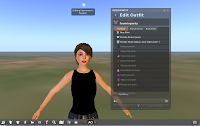
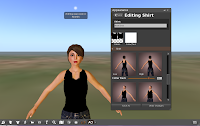
    Now you want to edit your appearance to add you new creation. For Firestorm users, either right-click and edit outfit or go to Avatar > Outfit. From the gear icon drop down menu, select "New Clothes" > "New Shirt". Then click on the fabric box and find your uploaded shirt under Textures in the Inventory folder
    and voila!


    You can also edit certain areas of the outfit by clicking the 'edit outfit' icon on the upper right of the 'appearance' menu. With this particular example I can really only edit the cut at the collar.


    TATTOOS


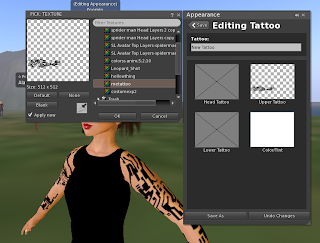
    Tattoos work similarly as clothes. Following the Robin Wood template, I applied my desired design ("Jackknife Tattoo" designed by EA) and how I would like it to appear.


    We also would save this as a transparent .png or .tga and upload it onto our server. From there, we click the "Go to additional options" icon > "New Clothes" > "New Tattoo". Click the "Upper Tattoo" box and select your uploaded image from under the "Textures" folder under "Inventory". And there you have it!


    Friday, September 16, 2011

    Second Life: Navigation Event

    Grand Canyon

    The Grand Canyon in Second Life was quite impressive. The terrain resembled the actual place and there was a lot of scenery to be found. I found it quite amusing that the place itself was very much like any tourist hotspots with all sorts of fun activities to partake in. Renting a kayak seemed like one, and if you join the group, you can even go in the helicopter (but why would anyone want to do that when they can fly themself?). There were even rainbow colored orbs about so if you had a dancing partner, you can bust a groove together.

    I even made a new friend while I was venturing through this digitized national park who wanted to make it very clear to me that Second Life was not a game but a 'second life' (and in all fairness he/she is right in that respect).

    Here is a spot that I found quite gorgeous what with the greenery, the detailed texture of the terrain, and even the water. On the bottom right corner of this image were the aforementioned rainbow colored orbs that prompt an action if certain criteria is met (such as having a partner to dance with).

    Here is the helicopter (sponsored by Coca Cola) a user can user provided they join the group of Grand Canyon.

    Though death is possible, falling is hardly (as far as I've noticed) a concern in the game. Thus I really enjoyed these cautions signs as they gave an added spice to immersion and re-creating the Grand Canyon experience.

    Speaking of caution signs....watch out for free roaming Triassic creatures...

    Somehow I found myself at a Lake Tahoe ski resort. I really enjoyed this window frame that had an animation of snow falling. Gave an added cozy feeling to the cabin I entered.


    Great Wall of China

    This particular location was quite breathtaking. It is quite interesting that they restricted flying so as the user can experience the 'wall' in its full extent on foot, thus also implementing a more immersive environment this way. And as far as I explored, just like the real Great Wall, no bathrooms to be found.

    I really loved this Buddha statue found outside the wall. It is really hard to believe that someone just made this within the game.

    Dragonfly
    This location was quite breathtaking given the fantasy themes implemented in this environment. From the floating wisps of light, to the snow white colored vegetation.


    Thursday, September 8, 2011

    Second Life


    My avatar on Second Life is a slightly tweaked "Female Pirate" here donning a multi-layered skirt. I lengthened the hair (which could only be done for the back) and made some adjustments to the skirt. I was pretty satisfied with the overall look which is why I didn't make that many changes. Strangely, there was only one option for the eye color which as a pre-loaded image of blue eyes.


    The first scheduled event I went to was a supposed dance party. I went around the scheduled time and surprisingly, the entire area was barren. I walked around and entered every building within my proximity but it was just full of posters. After walking around enough I finally ran into another user:

    I spoke with him (or her) for a bit, asking where the party was in which they replied with "That's what I'd like to know to". This user told me that it sure as hell wasn't on top of any buildings as they flew around everywhere.


    After that we parted ways, looking for this supposed dance party. After that I decided to search elsewhere and was much more successful.


    For one, it actually looked like a dance floor! What with the disco lights and of course, people dancing. A prompt for a user to 'animate' my avatar showed up and I clicked "ok" in which my avatar quickly began to start dancing similarly to the other female dancers. The other users hardly responded to me as I just made simple "greetings" in which they replied back with.

    Feeling out of place, I decided to switch to the "party avatar":

    I didn't change much with the party avatar. Just enough to blend in as my female pirate looked kind of (hilariously) out of place.

    Other users responded to me as I left, exchanging farewells:


    The first non-event Popular place I went to was the "Secret Garden", the preview screen looked gorgeous and who could resist an invitation to dance in a romantic and peaceful garden. It was indeed, quite pretty with the light hues of pink, purple, and blue. I was even greeted by a user who was inquiring about my use of Second Life and if I had any questions.


    I was initially greeted with a "Good morning" so I am assuming this was a user across the world.

    The next Popular Place I visited was "London". Who can resist London after all! However, it was a bit of a disappointment as it looked nothing like.

    Ah but there was English flags I suppose!

    Friday, September 2, 2011

    Toontown Research Questions


    Attempt some collaborative actions such as Chat and teaming up to fight Cogs. Describe the basics of what you did and the results. What were the limitations you experienced?

    I simply encountered a Cog while another player was nearby. We each executed an action to defeat the Cog. A limitation was eliminating other players. At times, I ran into ‘leechers’, people who would simply join the fight and do nothing while I did all the fighting and they reaped the same benefits. There was no way to force the other player to do anything or to get rid of them.

    The same goes for collaborative minigames through the trolley. Depending on the game, a different user can simply do nothing and reap the benefits. While not as much as the one doing the work, the other user still gets something for nothing.


    As depicted here, I had no gags on hand so I simply could "pass" every one of my turns while these two other users do all the work.

    What was your favorite activity in Toontown?

    My favorite activity or rather, activities in ToonTown are the minigames that generate whenever you get on the Trolley. If I had to pick one in particular, it would be “Toon Escape”, the side scrolling game that requires the player to jump and collect ‘Cog treasures’ while also defeating any Cogs along the way.


    Identify and comment on 3 aspects of ToonTown that relate to the HOH-Agency Chapter.

    1. One aspect of Agency through the world of ToonTown would be the ability to (albeit limited) say what I want through the keyboard. In this manner I am incorporating myself via my avatar in the game’s universe.


    2. Another aspect would be through choice of interaction within the game. With the exception of the tutorials at the beginning, it is entirely up to the player’s choice with whom they want to speak with. There are no mandated interactions or destinations. In addition, the player can easily decide how they interact with ‘Cogs’, the villains of ToonTown. One can engage battle by walking up to them or simply avoiding them by walking around. Furthermore, even if the player were to accidentally or no longer felt like fighting, they can simply ‘escape back to the Playground’.


    3. A third aspect of how TownTown implements Agency is through appearance -transformation. The player can choose whatever colors and outfit they would like to be in and can change it at any given time. In addition, they can acquire more accessories and outfits if they wish in a shop. Not only is the avatar’s appearance customizable but their home as well. Every player is given a house within the world of ToonTown and they can purchase and arrange furniture however they wish.

    Unfortunately, this avatar is not me but someone I happened to run into with a very interesting outfit.